Usage
Pressable is a Core Component that can detect various stages of press interactions on any of its defined children.
<Pressable onPress={onPressFunction}> <Text>I'm pressable!</Text></Pressable>How It Works
On an element wrapped by Pressable:
- onPressIn is called when a press is activated.
- onPressOut is called when the press gesture is deactivated.
After onPressIn, the user will either:
- Remove their finger, triggering onPressOut followed by onPress.
- Hold their finger longer than 500 milliseconds before removing it, onLongPress is triggered. (onPressOut will still fire when they remove their finger).
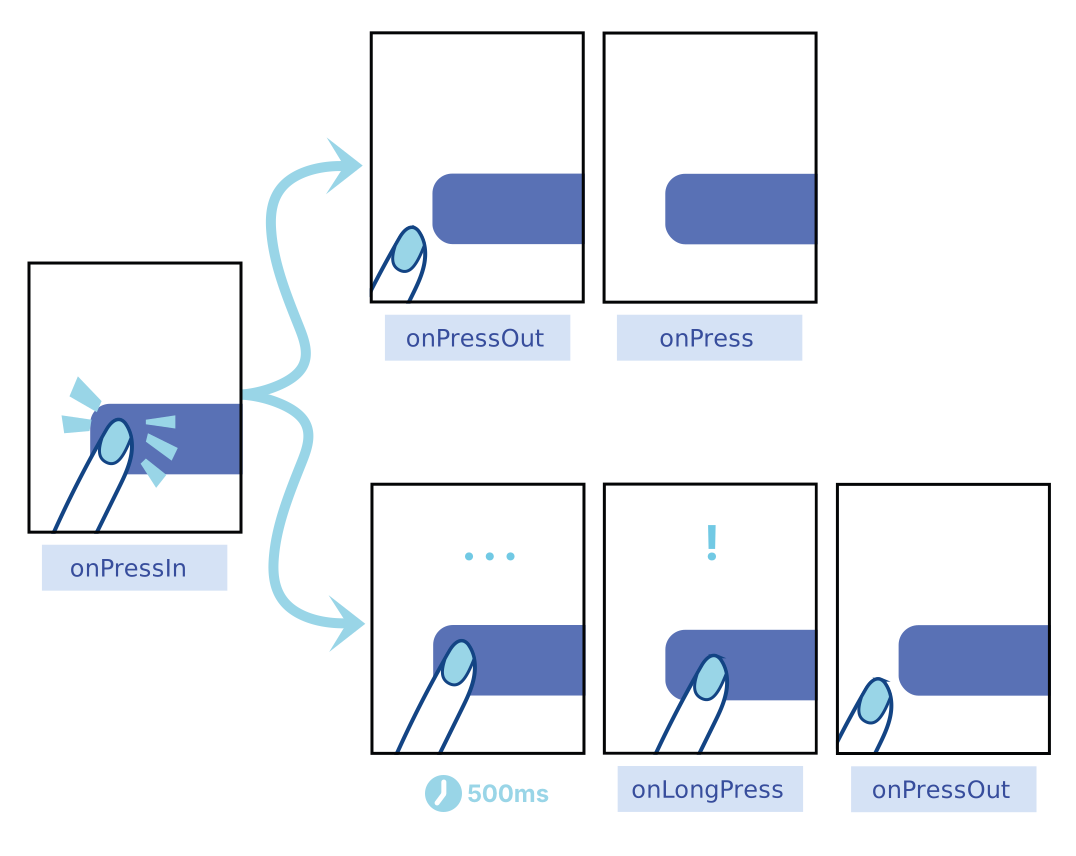 Diagram from React Native Documentation
HitRect & HitSlop
Fingers are not the most precise instruments, and it is common for users to accidentally activate the wrong element or miss
the activation area. To help, Pressable has an optional HitRect you can use to define how far a touch can register away from
the wrapped element. Presses can start anywhere within a HitRect.
PressRect allows presses to move beyond the element and its HitRect while maintaining activation and being eligible for a
"press"—think of sliding your finger slowly away from a button you're pressing down on.
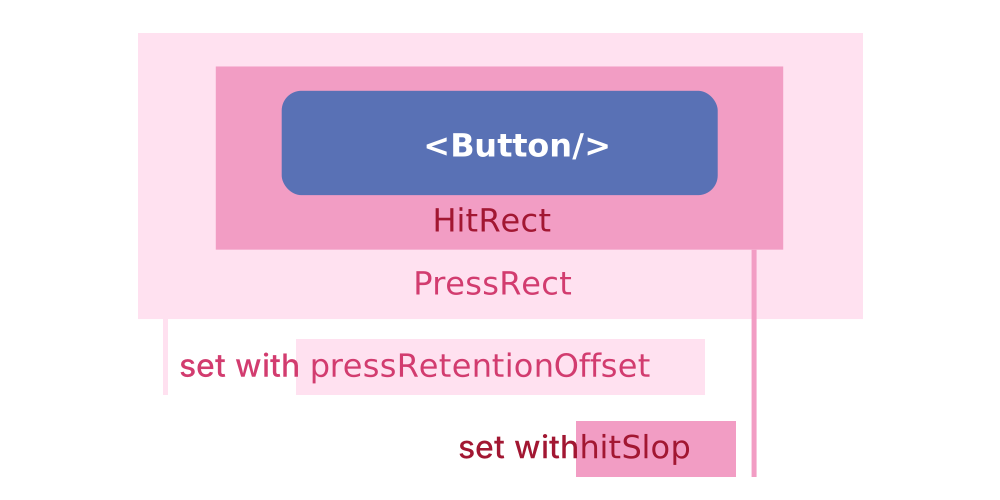 Diagram from React Native Documentation
You can set HitRect with hitSlop and set PressRect with pressRetentionOffset.
Styling
The style prop can be a function, an array of objects, or an object that defines the style of the Pressable component with design tokens.
When using a function, the function will receive the pressed state as an argument.
Additionally, the children prop can be a function that receives the pressed state as an argument or a React element.
Best Practices
- Press Feedback: Always provide clear visual feedback (like color changes or animations) to indicate the element has been pressed.
- Hit Slop: Use the
hitSlopprop to extend the touchable area if needed, especially for smaller elements. - Optimize Press Timing: Use
onPressInandonPressOutwisely to handle animations or delays without affecting user experience.
Accessibility Considerations
- Pressable Texts: Ensure that the label of the pressable is descriptive for screen readers.
- Feedback for Press: Make sure the visual feedback is discernible for all users, including those with visual impairments.
- Keyboard Navigation: Ensure that pressable components are focusable and navigable with a keyboard.
Pressable Classes
| Class Name | Description |
|---|---|
| abyss-pressable-root | Pressable root element |
Pressable Props
| Prop Name | Type | Default | Description |
|---|---|---|---|
| hitSlop | Inset | Insets | - | This defines how far a touch event can start away from the view. |
| pressRetentionOffset | Inset | Insets | - | Additional distance outside of this view in which a touch is considered a press before onPressOut is triggered. |
| style | Function | Abyss.Style<"Pressable"> | - | Object or array of objects defining the style of the Pressable component with design tokens |